TikTok Coins, treasure boxes and Goody Bags: practical guides
Choose from 21 English guides: understand TikTok Coins, Treasure Boxes and Goody Bags, find a LIVE room, read its data or resolve an opening issue. Website screenshots and older Android test screenshots are labelled separately; the LiveMira app is now on Google Play.
✓ Practical steps✓ Clear data definitions✓ You participate in TikTok
01
Start with the event and the data
A room’s total coins describe its LIVE event, not a guaranteed addition to your account balance. Treasure boxes and Goody Bags use different ratio denominators in LiveMira; viewer count is a separate number.
Use the treasure box finder guide to understand discovery, countdowns and the difference between a Free web list and separately configured Telegram alerts.
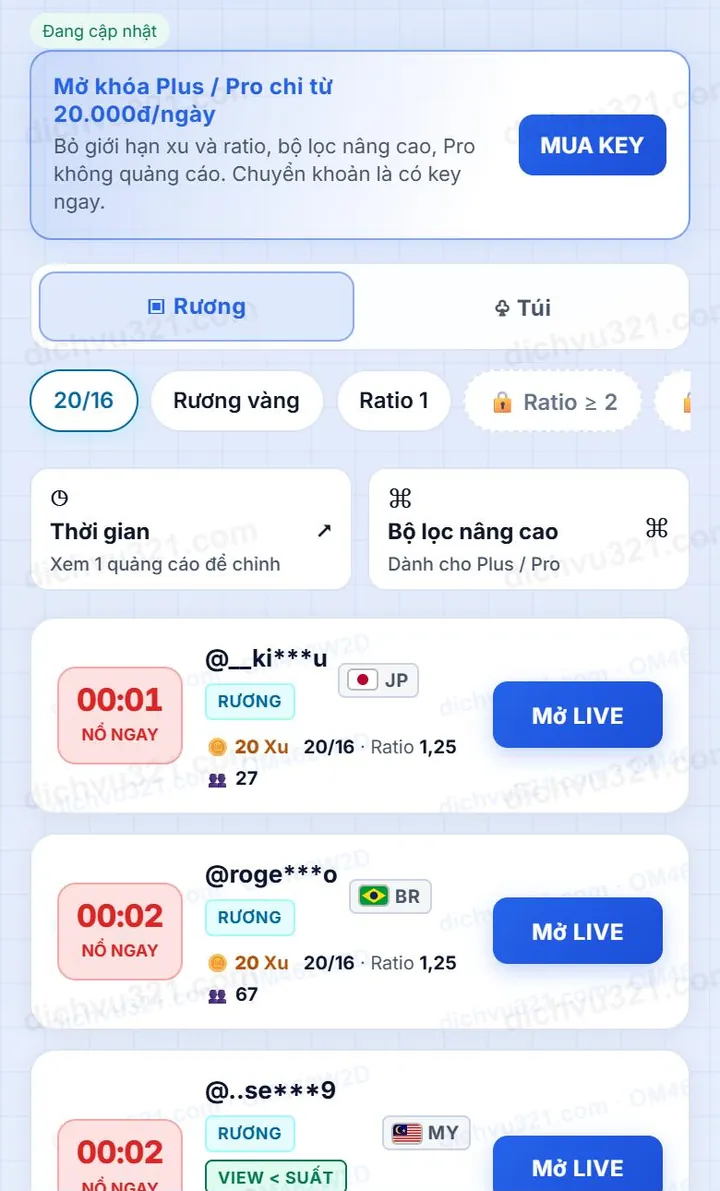
The LiveMira walkthrough shows how to choose Boxes or Bags and a tab within your plan and open a room. You check the event and participate manually in the official TikTok app.
Free plan: locked tabs and the Advanced filters panel labeled “For Plus / Pro”.
03
Investigate a missing event or an opening issue
An empty list can mean no matching events, a restrictive selection or an interrupted connection. The message shown on screen is a better starting point than assuming there are no events anywhere on TikTok.
The 21 English guides below cover Coins, discovery, boxes, bags, filtering and common issues. Use the language selector to open the corresponding article in another supported language.
Start with what a TikTok Treasure Box is, then how its ratio is calculated. The website has Free, Plus and Pro with separate filter access shown under Plans. Plus and Pro can edit remaining time directly. Free time editing requires a rewarded ad, and website rewarded ads are not ready yet. Website, Android app and Telegram bot access are separate.