Step-by-Step Guide to Buying LiveMira Keys with USDT
This guide walks you through the entire process of buying a Plus or Pro key with USDT on the LIVE page, with actual screenshots for every step: choosing a plan, selecting a network, creating an order, transferring USDT, confirming, and entering your code. No account registration or TikTok password required.
✓ Practical steps✓ Clear data definitions✓ You participate in TikTok
01
Why pay with USDT
USDT is pegged to the US dollar, keeping plan prices virtually immune to exchange rate fluctuations. You can pay from any country using a crypto exchange or personal wallet, with no Vietnamese bank account needed.
The system detects transactions directly on the blockchain and automatically credits your time without manual approval. If you are in Vietnam with a local bank account, MB bank transfer is still the fastest method; see the guide to buying keys via bank transfer.
02
Step 1: Open the PLANS · BUY KEY tab on the LIVE page
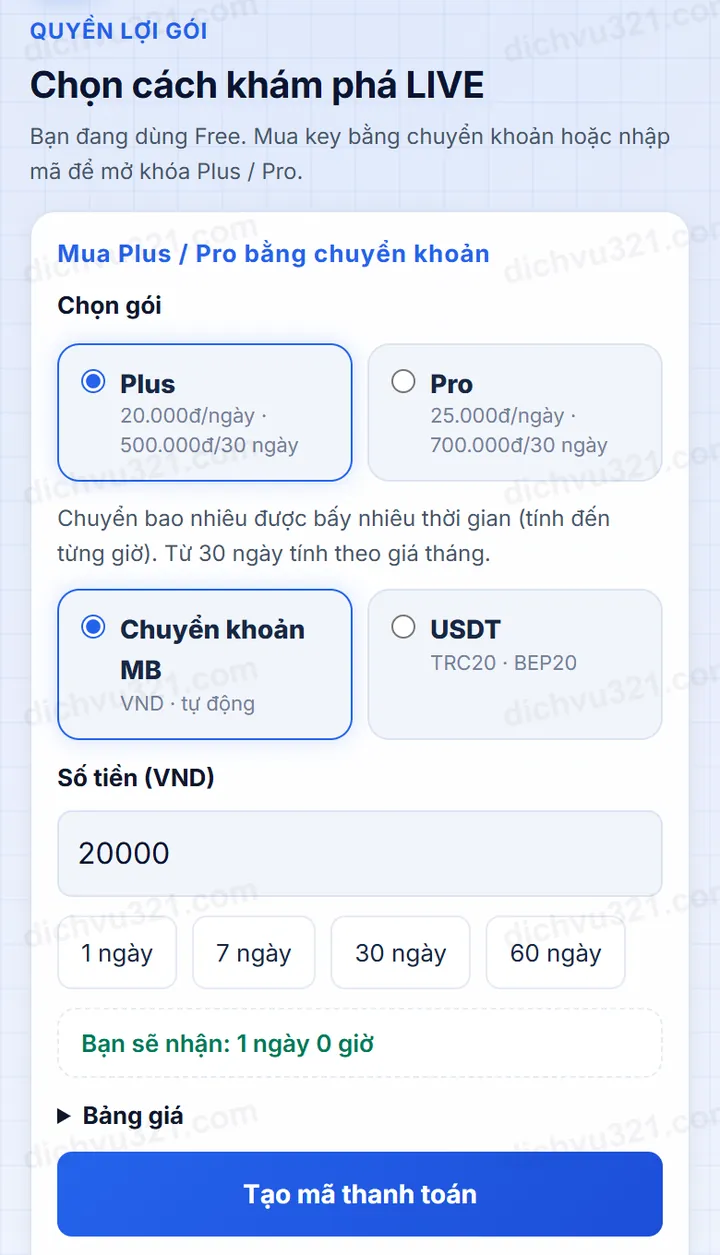
Open the LIVE page and click PLANS · BUY KEY in the bottom bar (or the Plans tab on desktop). The “Buy Plus / Pro” window appears with two plan options and available payment methods.
Choose Plus if you want more tabs, direct “Time” editing and the “Minimum coins” filter for boxes and bags. Choose Pro if you also want the “Custom” tabs, the full advanced filters, and just one small banner ad.
PLANS · BUY KEY tab: choose Plus or Pro before selecting a payment method.
03
Step 2: Select USDT, choose network, and enter days
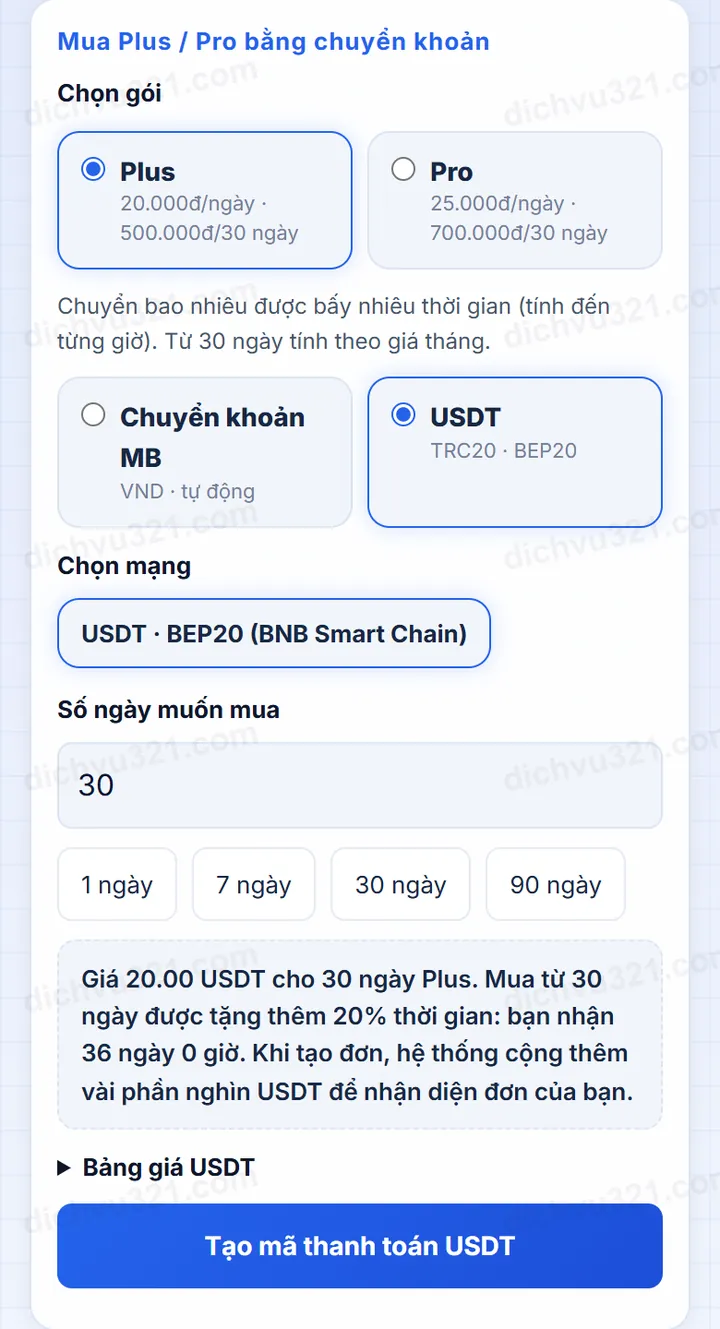
Click USDT. Directly below, Choose network appears: the website displays only networks that are currently accepting payments, which now include USDT · BEP20 (BNB Smart Chain) and USDT · TRC20 (Tron).
Enter Days to buy or select 1, 7, 30, or 90 days. The price line below shows the USDT amount due and your plan duration, including any bonus days for longer plans. Click USDT prices to view the full pricing table for Plus and Pro.
Ensure the selected network matches where you send funds from. When withdrawing from an exchange, BEP20 is typically labeled BSC or BNB Smart Chain (BEP20). If you are unsure about the difference, read the guide to transferring USDT on the right network before paying.
Select USDT, choose network, enter days, then click Create USDT payment.
04
Step 3: Create order and transfer the exact USDT amount
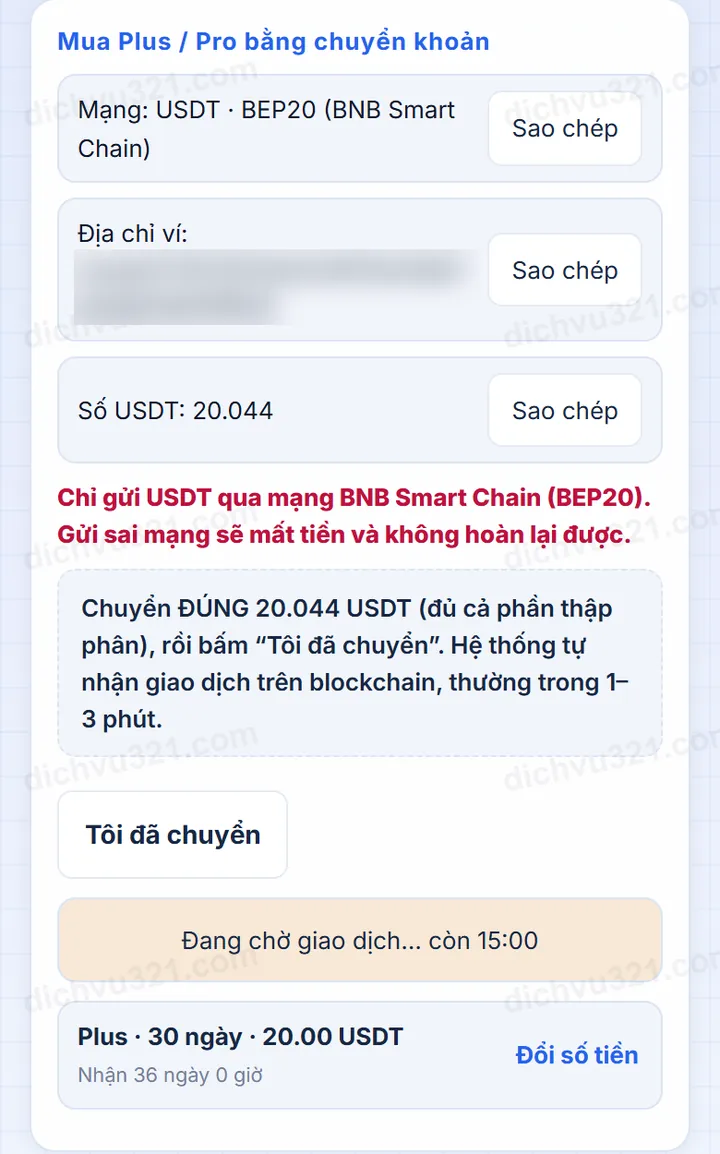
Click Create USDT payment. The order screen displays three rows with Copy buttons: Network, Wallet address, and USDT amount. Always copy the wallet address directly from your active order—never type it manually or copy from screenshots, articles, or messages.
The USDT amount includes extra decimal places at the end, such as 20.044 instead of 20. These decimal digits identify your specific order among incoming transactions, so you must send the exact full amount, decimals included.
Orders are held for 15 minutes, with the remaining time shown under “Waiting for your transfer”. If withdrawing from an exchange, always factor in withdrawal fees: the amount received by the LiveMira wallet must match the exact order amount, not your pre-fee input.
USDT order: copy the network, wallet address, and USDT amount. The wallet address in the screenshot is blurred.
05
Step 4: Click “I have paid” and wait for confirmation
Once sent, return to the page and click I have paid. The system monitors the blockchain and usually detects the payment within 1–3 minutes. Keep the page open while waiting; if closed accidentally, reopen the Plans tab in the same browser to view your order.
Upon receipt of full payment, the screen confirms “Received … USDT. … added.” alongside an Activation code with a Copy button. Save this code securely, then click Apply now to activate your plan on the current device.
If the 15-minute window expires while your transaction is in transit, do not create a new order and pay again. The system still credits your plan automatically once the transfer arrives; if it does not appear after a few minutes, contact support with your transaction hash (TxID).
06
Step 5: Enter activation code when switching devices or browsers
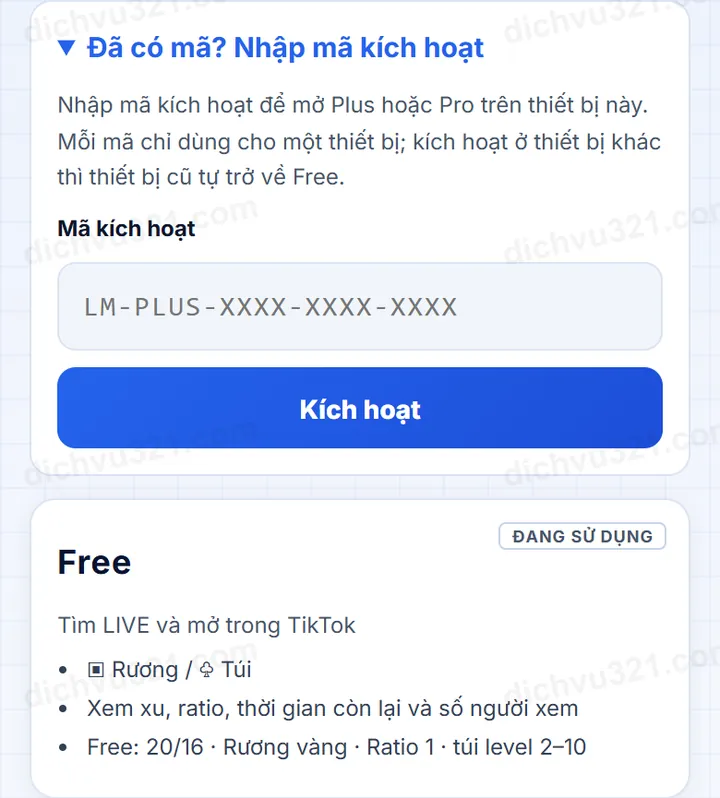
Each key binds to a single device or browser. To use it on another machine, open the Plans tab on that device, click “Have a code? Enter your activation code”, paste your LM-PLUS-… or LM-PRO-… key, and click Activate.
If the code is still linked to another device, you will see a message that it is already in use there. In that case, tap “Remove code from this device” on the old device first, then enter the code on the new one. Once activated, the label in the top corner changes from FREE to your plan.
The “Have a code? Enter your activation code” field is used to activate plans on another device.
07
Common errors when paying with USDT
Wrong network (e.g., sending via TRC20 or ERC20 for a BEP20 order): funds will not reach LiveMira's wallet and are practically unrecoverable.
Underpaying due to exchange withdrawal fees: add the fee on top so the received amount exactly equals the order. Minor deficits may occasionally match automatically, but do not rely on this.
Rounding the USDT amount (sending 20 instead of 20.044): the system cannot identify your order automatically, requiring manual verification.
Creating multiple orders at once: keep and pay for only one active order to prevent amount mismatches.
Closing the page before receiving your key: reopen the Plans tab in the same browser; if the key is missing, contact support with your TxID.
LiveMira is an independent service and is not owned, sponsored, endorsed by or affiliated with TikTok or Telegram.
Do I need an exchange account to buy with USDT?
No. You can send funds from a non-custodial wallet like Trust Wallet or MetaMask, or from a crypto exchange, as long as the network and USDT amount are exact.
Can I buy USDT with a Visa or Mastercard?
Yes. Purchase USDT on an exchange or service supporting card payments, then transfer it to your LiveMira order. See our guide to buying USDT with bank cards.
How long does it take to receive the key?
Typically 1–3 minutes after the blockchain confirms your transaction. It may take longer during periods of network congestion.
What happens if I send on the wrong network?
Wrong-network transactions are usually irreversible. Contact support with your TxID to check, but fund recovery cannot be guaranteed.
Can USDT keys be used on the Android app?
No. Plans purchased on the website are independent of the Android app; keys only unlock website access.
Can I get a refund if I bought the wrong plan?
Contact support with your order ID and TxID; each case is reviewed individually.
LIVEMIRA LIVE
Ready to explore TikTok LIVE?
Choose a room in the Free list, then check the event in TikTok before participating.