Transfer USDT on BEP20 and TRC20 Networks for LiveMira
Most issues with USDT payments stem from selecting the wrong network or omitting withdrawal fees. This guide explains BEP20 and TRC20, how to transfer from exchanges or personal wallets so LiveMira receives the exact order amount, and what to do if an amount falls short or an order expires.
✓ Practical steps✓ Clear data definitions✓ You participate in TikTok
01
USDT runs across multiple blockchain networks
While all called USDT, tokens circulate on distinct blockchains: BNB Smart Chain (BEP20), Tron (TRC20), Ethereum (ERC20), and others. Each network uses unique address formats, fee structures, and confirmation speeds. A transfer made on one chain never appears on another.
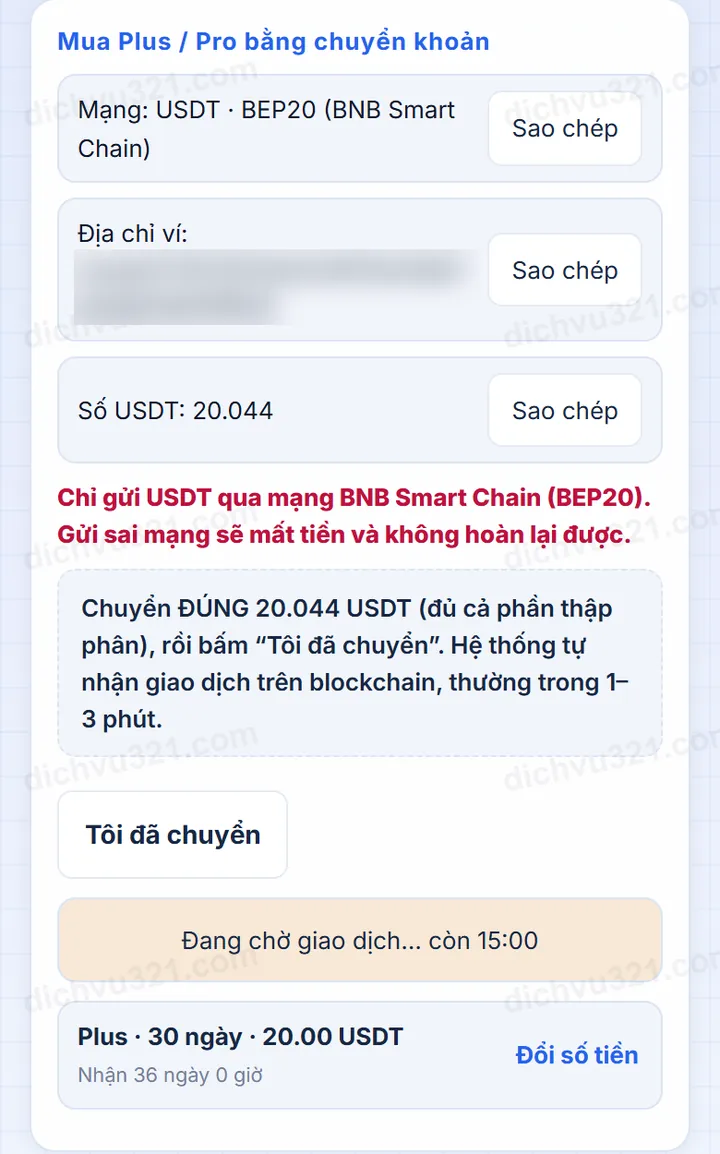
LiveMira orders clearly state the designated network on the first line with a red warning banner. The website shows only networks that are currently accepting payments; both BEP20 and TRC20 are accepted now, so send on the network written on your order.
The Network line and red warning indicate that this order only accepts USDT on BEP20.
02
Selecting the correct network on your exchange or wallet
Order specifies BEP20 (BNB Smart Chain): select BSC, BNB Smart Chain, or BEP20 on your exchange. Addresses begin with 0x.
Order specifies TRC20 (Tron): select TRX, Tron, or TRC20 on your exchange. Addresses begin with the letter T.
Do not select ERC20 (Ethereum) or other networks even if address formats look identical: 0x addresses are valid on Ethereum, so the exchange may not show an error, but funds will never arrive at LiveMira.
Some exchanges auto-suggest a network based on the address; always verify the selection manually before confirming.
03
Factoring in withdrawal fees so LiveMira receives the exact amount
When withdrawing from an exchange, network fees are typically deducted from your entered amount. For example, if an order requires 20.044 USDT and the BEP20 withdrawal fee is deducted, entering 20.044 means LiveMira receives 20.044 minus the fee, resulting in an underpayment.
The correct way: check the “Receive amount” line on the withdrawal page and adjust your input until that line matches the order amount exactly. If your exchange offers an option to deduct fees from your remaining balance rather than the withdrawal amount, enter the order amount directly.
The decimal portion at the end of the USDT amount identifies your specific order. While marginal shortfalls may occasionally match automatically when only one order is pending on that network, you should not rely on this.
04
Sending from personal wallets (Trust Wallet, MetaMask…)
Non-custodial wallets do not deduct gas fees from USDT; instead, network fees are paid in the blockchain's native token—BNB for BEP20, TRX for TRC20. Keep a small reserve of BNB or TRX in your wallet, or the transaction will fail.
In your wallet, select the correct USDT token for your network (USDT BEP20 or USDT TRC20), paste the order address, input the exact USDT order amount, and transfer. Afterwards, click I have paid on the LIVE page.
05
Late, underpaid, or mismatched transfers: how to resolve
Order expired after 15 minutes while transaction is pending: the system still credits your plan automatically once detected on-chain. Do not submit a second payment.
Underpaid amount: contact support with your order ID and TxID; your plan may be adjusted to the amount received or you may be asked to top up the difference.
Overpaid amount: contact support with your order ID and TxID to verify and process the excess payment.
Wrong network: funds do not reach LiveMira's wallet and are generally irrecoverable. Submit your TxID to support nonetheless for review.
The TxID (transaction hash) can be found in your exchange withdrawal history or wallet transaction details; this is the most critical detail for support inquiries.
06
Checklist before confirming your transfer
Network on exchange or wallet matches the network on the order.
Pasted address matches the full order address (verify at least the first 4 and last 4 characters).
Received amount matches the exact USDT order figure, including decimals.
Order timer is still active under “Waiting for your transfer”.
Personal wallet has sufficient BNB or TRX to cover network gas fees.
LiveMira is an independent service and is not owned, sponsored, endorsed by or affiliated with TikTok or Telegram.
Is BEP20 or TRC20 cheaper?
Fees fluctuate by exchange and network congestion. Choose the network accepted by your active order and compare rates displayed on your exchange.
Can I send to a 0x address via ERC20?
No. While 0x addresses work on both Ethereum and BNB Smart Chain, LiveMira orders only track transactions on the specific network stated in your order.
Why hasn't LiveMira received my transfer even though the exchange marked it successful?
The transaction may still lack required block confirmations, was sent on the wrong network, or was underpaid. Verify the TxID on a blockchain explorer, then contact support if needed.
Can I make multiple partial transfers for one order?
No. Each order relies on a unique amount for identification; splitting payments makes automatic matching difficult.
How long does transaction confirmation take?
Usually 1–3 minutes on BEP20 and TRC20; exchanges may occasionally hold withdrawals longer for internal security checks.
Do I need to include a note or memo?
No. USDT transfers on BEP20 and TRC20 to LiveMira do not require a memo; only the correct network, address, and amount are needed.
LIVEMIRA LIVE
Ready to explore TikTok LIVE?
Choose a room in the Free list, then check the event in TikTok before participating.