LiveMira now accepts Visa and Mastercard directly: choose International card on the LIVE page or on your Account page, then pay on the Polar checkout page. If your card cannot be used there, you can still buy USDT with your card on a crypto exchange and pay with USDT. This guide covers both ways, the costs and the risks to avoid.
✓ Practical steps✓ Clear data definitions✓ You participate in TikTok
01
Easiest way: pay by card on the Polar checkout page
On the LIVE page, open the Plans tab, choose your plan and duration, choose International card (Visa, Mastercard · USD), then press Pay by card. You are taken to the Polar checkout page to enter your card. When the payment goes through, the time you paid for is added to your key. On the Account page you can also pay by card to get coins for your wallet, buy keys or rent the API.
Card prices are in USD and already include card fees. Each card payment has a minimum amount, shown before you pay, because the card processor charges a fixed fee on every transaction. Polar may add tax for your country. LiveMira does not see or store your card details: the payment is handled by Polar.
If your bank declines the payment or the card checkout is not available, use the USDT route below.
02
Another way: card → USDT → LiveMira order
The workflow consists of three steps. First, use your card to purchase USDT on a crypto exchange or on-ramp service that accepts cards. Second, the USDT settles in your exchange wallet. Third, withdraw the USDT to the wallet address in your LiveMira order, using the exact network and amount.
LiveMira neither sees nor stores your payment card details. Card transactions take place entirely on your chosen platform, governed by its terms and policies.
03
Step 1: Choose a platform that supports card purchases
Major crypto exchanges and on-ramps provide a “Buy with card” option for Visa and Mastercard. When selecting a platform, verify three items: legal operation in your jurisdiction, support for BEP20 or TRC20 USDT withdrawals, and total fee rates.
First-time users usually undergo identity verification (KYC) with government ID and a facial scan. Because this can take anywhere from minutes to several hours, complete verification ahead of time.
04
Step 2: Check the required USDT amount on LiveMira first
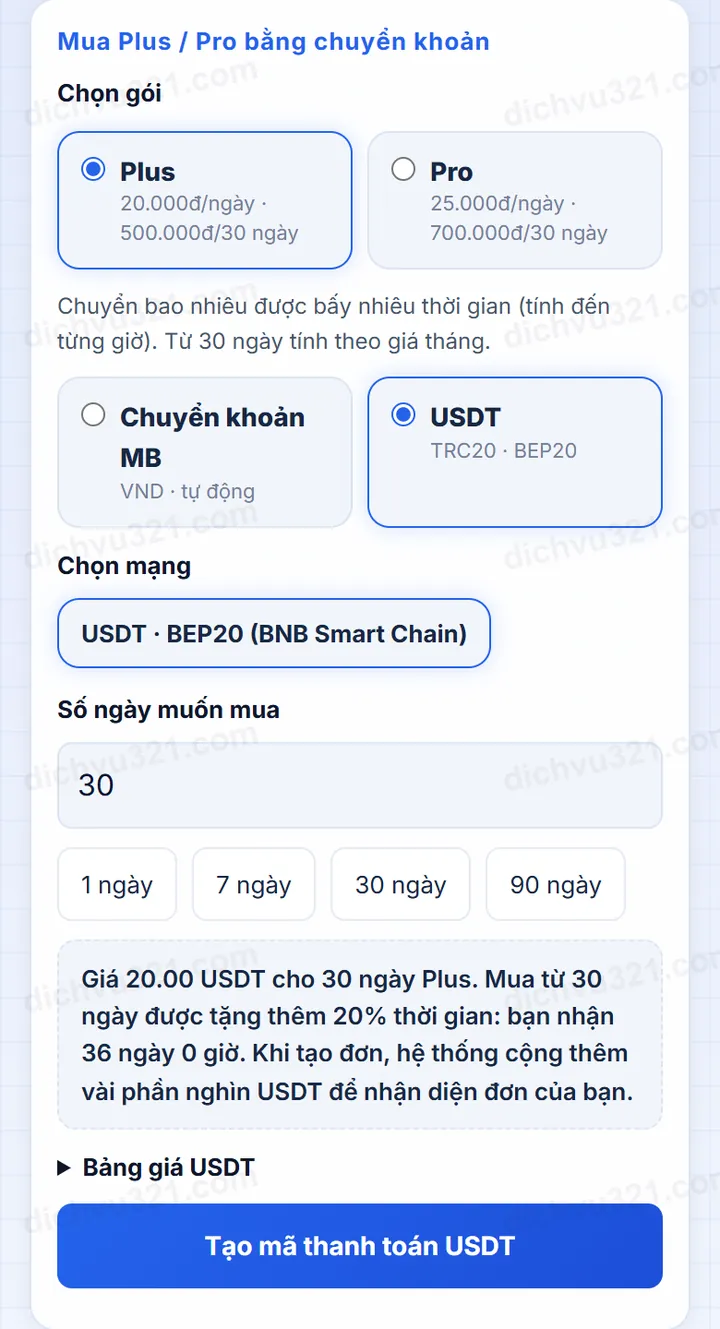
Open the LIVE page, navigate to the Plans tab, select your plan and duration, then click USDT to view the exact price. You do not need to click Create USDT payment yet if card verification takes time, as orders are held for only 15 minutes.
Purchase slightly more than the plan price to cover exchange withdrawal fees, typically a small USDT fee. See step-by-step LIVE page instructions in our guide to buying keys with USDT.
Check the USDT price for your chosen duration first, then buy USDT with your card.
05
Step 3: Buy USDT with your card
On the platform, go to the Buy with card section, select USDT, enter the purchase amount or USDT quantity, add your Visa/Mastercard, and confirm. Your bank may prompt for an OTP or 3-D Secure authentication.
Note that your bank may classify this as a cryptocurrency transaction, applying international transaction fees or blocking it if international online transactions are disabled. If declined, check card security settings in your banking app.
06
Step 4: Create order and withdraw USDT to LiveMira
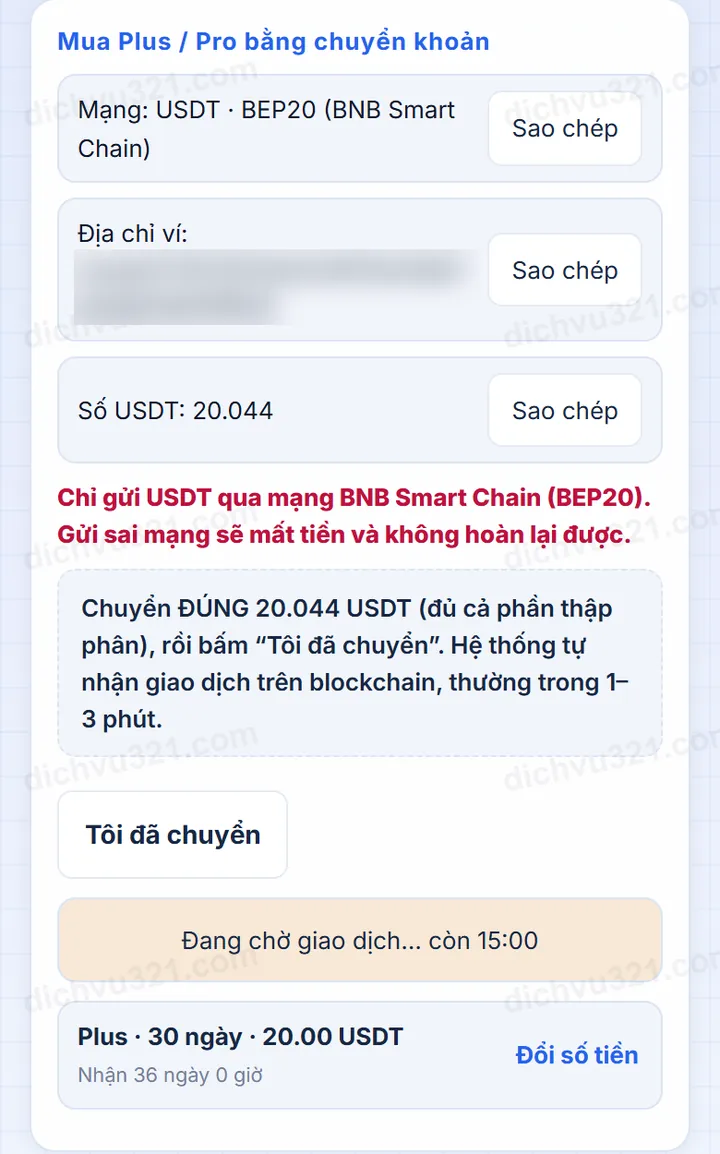
Once USDT arrives in your exchange wallet, return to the LIVE page and click Create USDT payment. Copy the Wallet address and USDT amount shown on the order.
In your exchange, select Withdraw USDT, paste the address, choose the matching network (BEP20 is often listed as BSC or BNB Smart Chain), and enter the amount so that the received sum matches the order exactly. For fee management and network details, see our guide to transferring USDT on the right network.
After submitting the withdrawal, click I have paid on the LIVE page and wait for your activation code to appear.
Copy the wallet address and USDT amount from your own order (address blurred in illustration).
07
Risks to avoid
Never buy USDT from unsolicited direct messages or prepay unauthorized intermediaries; use reputable exchanges or regulated services.
Never share card photos, CVV security codes, or OTP codes with anyone, including individuals claiming to represent LiveMira support.
When using P2P trading (buying from other users), rely exclusively on platform escrow and review counterparty terms carefully.
Cryptocurrency markets fluctuate; while USDT is stable, card processing fees and on-ramp exchange rates diverge from spot market rates.
Comply with local digital asset regulations in your country. This article provides technical instructions only, not financial advice.
LiveMira is an independent service and is not owned, sponsored, endorsed by or affiliated with TikTok or Telegram.
Does LiveMira accept Visa and Mastercard directly?
Yes. Choose International card on the LIVE page or on the Account page and pay on the Polar checkout page. Prices are in USD and include card fees; Polar may add tax for your country. You can also pay with USDT bought by card, or by MB bank transfer if you have a Vietnamese bank account.
How long does buying USDT with a card take?
If your exchange account is already verified, purchases usually settle in minutes. Initial identity verification can take longer.
How much USDT should I buy?
Buy enough to cover the plan price, exchange withdrawal fees, and a small buffer. The exact plan price displays as soon as you select USDT in the Plans tab.
What are the card purchase fees?
Fees depend on the exchange platform, card issuer, and bank. Check the fee breakdown on the exchange's checkout screen before confirming.
Can I use a local domestic debit card?
International payment-enabled cards (Visa, Mastercard) are generally required. Domestic-only cards (such as Napas) are not supported on foreign platforms.
What if the exchange holds my USDT withdrawal?
Wait for the exchange security review to finish or reach out to their support. Do not generate a LiveMira order until you can withdraw immediately.
LIVEMIRA LIVE
Ready to explore TikTok LIVE?
Choose a room in the Free list, then check the event in TikTok before participating.