How to use LiveMira: find a LIVE, then open TikTok
LiveMira helps you discover TikTok LIVE rooms with Treasure Boxes or Goody Bags. Choose an event type, compare the current information and open the room you want. Participation and any reward remain inside TikTok.
✓ Practical steps✓ Clear data definitions✓ You participate in TikTok
01
Prepare TikTok before selecting a room
Check that the official TikTok app opens normally on your device. Any TikTok sign-in belongs there. LiveMira does not require a TikTok password, verification code or cookie to browse its discovery list.
Allow time to switch apps and read conditions. If the types are unfamiliar, read the box and bag comparison; a bag without winner slots uses a different count for its ratio.
02
Choose Boxes or Bags and a tab on the website
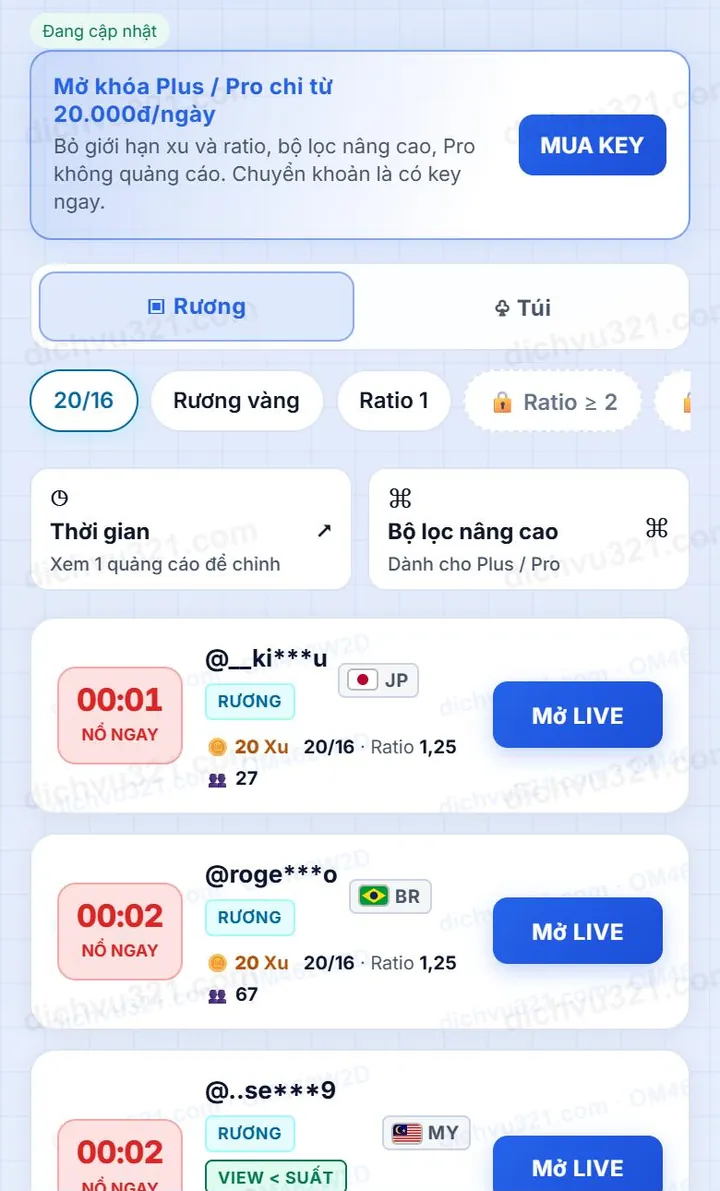
Visit the Free LIVE page. The buttons at the top select treasure boxes, hung boxes or Goody Bags; then choose a tab available to your plan. The updating list places earlier-opening events first.
Website Free has the box tab “Ratio 1” and the bag tab “Level 2–10”. Plus adds “20/16”, “Gold boxes”, “Ratio ≥ 2”, “Ratio ≥ 4”, “Hung boxes” and the bag tabs “Level 1” and “Level 0”; Pro adds “Lucky picks” and “Custom” for boxes and bags. See box filtering and bag filtering for each tab.
Free plan: locked tabs and the Advanced filters panel labeled “For Plus / Pro”.
03
Read one row before comparing several
Read the creator, event type and countdown, then Xu, Ratio and View. Xu means Coins; View is the audience count. Bag rows also show participants. Web usernames are partly hidden. Any country label describes creator metadata, not your location or eligibility.
Coins belong to the event. Ratio uses winner slots; a bag without winner slots uses participants. Neither predicts odds or a personal payout. The data guide provides examples.
04
Open the selected LIVE and inspect it in TikTok
Press “Open LIVE”, beside the room. On a phone it opens the TikTok app (confirm any browser request); on a computer it opens the room on tiktok.com. Check that the event is active, read its conditions and participate yourself using TikTok's available actions.
For an ended event, return to the fresh list. If TikTok never opens, use the opening checklist. Opening a room does not guarantee a reward.
05
Know which options are available today
The website has Free, Plus and Pro with separate filter access shown under Plans. Plus and Pro can edit “Time” (minimum remaining time) directly. Free time editing requires a rewarded ad, and website rewarded ads are not ready yet. Plus and Pro also get “Advanced filters”; see the advanced filters guide.
The LiveMira app is available on Google Play for browsing the list on a phone. Neither app guarantees Coins.
To buy, tap “PLANS · BUY KEY”: Plus costs 20,000 coins per day or 500,000 for 30 days; Pro costs 25,000 per day or 700,000 for 30 days; see how to buy a key. Each key works on one device at a time. To switch, tap “Remove code from this device” on the old device, then “Enter code” on the new one.
06
Return to fresh data after switching apps
A browser may suspend the page while you use TikTok or lock the device. On return, inspect status and current countdowns, or press “Refresh ↻”. “Pause updates” holds the list still while you read; the “List” view is sorted by time and “Fixed slots” keeps rows in place.
Settings offers light or dark appearance, fonts, 27 languages and “Sound alert”, which beeps when an event has N seconds left (0 turns it off). Website background updates are not guaranteed.
If a problem repeats, record its time and message and use service information for contact details. Keep credentials out of reports.