Free is enough to try finding LIVE rooms with boxes and bags; Plus unlocks more tabs, direct Time editing, Plus-level Advanced filters and the Counter; Pro unlocks every tab and the full filter set with just one small banner. This guide places real screenshots of each plan side-by-side so you can see the differences before deciding to buy.
✓ Practical steps✓ Clear data definitions✓ You participate in TikTok
01
Free Plan: Quick Look at the Basic List
Free requires no registration. Select boxes or bags, view total coins, ratio, remaining time and viewers, then click “Open LIVE” to jump into TikTok.
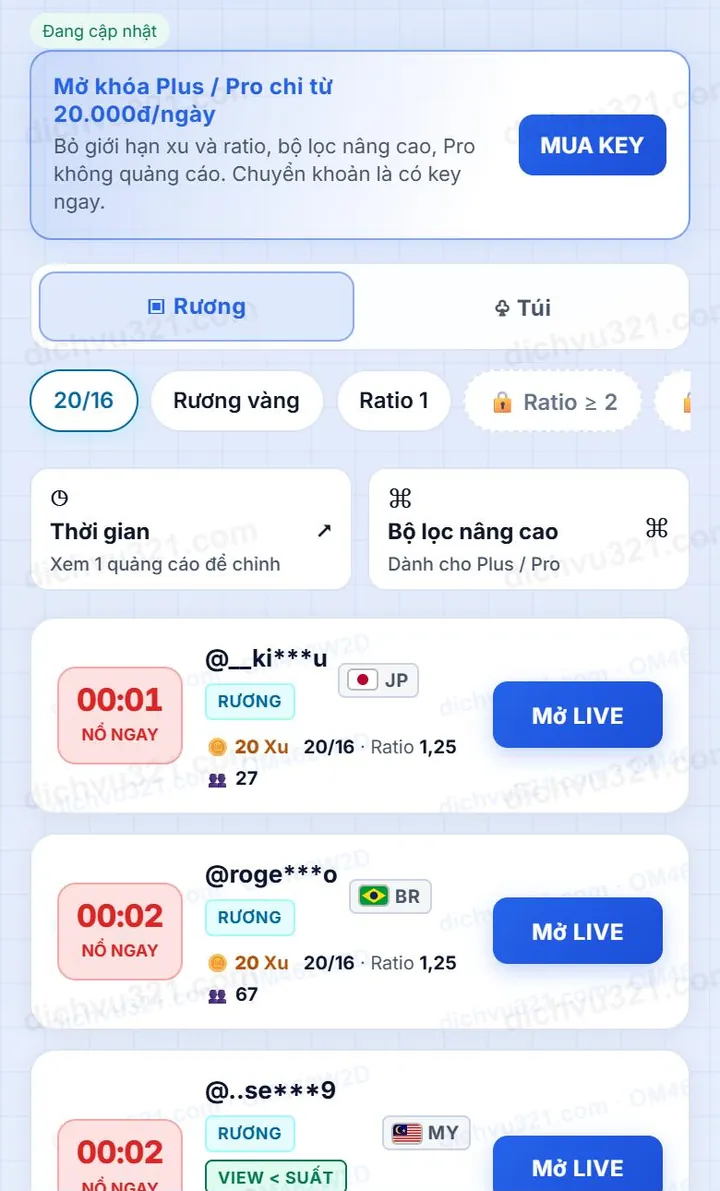
Free includes the box tab “Ratio 1” (one coin per winning slot) and the bag tab “Level 2–10”. Tabs with a lock icon, such as “20/16”, “Gold boxes”, “Ratio ≥ 2” or “Hung boxes”, require Plus or Pro. Free has ads in the list, no Counter and no advanced filters. Free would need a rewarded ad to edit “Time”, and rewarded ads are not available on the website yet.
Free plan: locked tabs and the Advanced filters panel labeled “For Plus / Pro”.
02
Plus Plan: More Tabs, Time Editing and Counter
Plus adds the tabs “20/16”, “Gold boxes”, “Ratio ≥ 2”, “Ratio ≥ 4”, “Hung boxes” and the bag tabs “Level 1” and “Level 0”. You can edit “Time” directly. Plus-level “Advanced filters” include “Minimum coins” and highlighting boxes above your chosen coin threshold (LARGE BOX). Plus has no coin or ratio ceiling.
Plus also includes a “Counter” button next to each room. In-list ads are removed, leaving only banners. “Filter boxes with fewer viewers than winning slots” belongs to Pro and is not available on Plus.
03
Pro Plan: Unlock All Tabs, One Small Banner
Pro includes everything in Plus and adds the “Lucky picks” tab (ratio 7+) and the “Custom” tab for both boxes and bags. Its “Advanced filters” are complete: “Minimum ratio”, “Box type”, “Box status”, bag levels 0–10 and the low-viewer filter. Pro shows just one small banner.
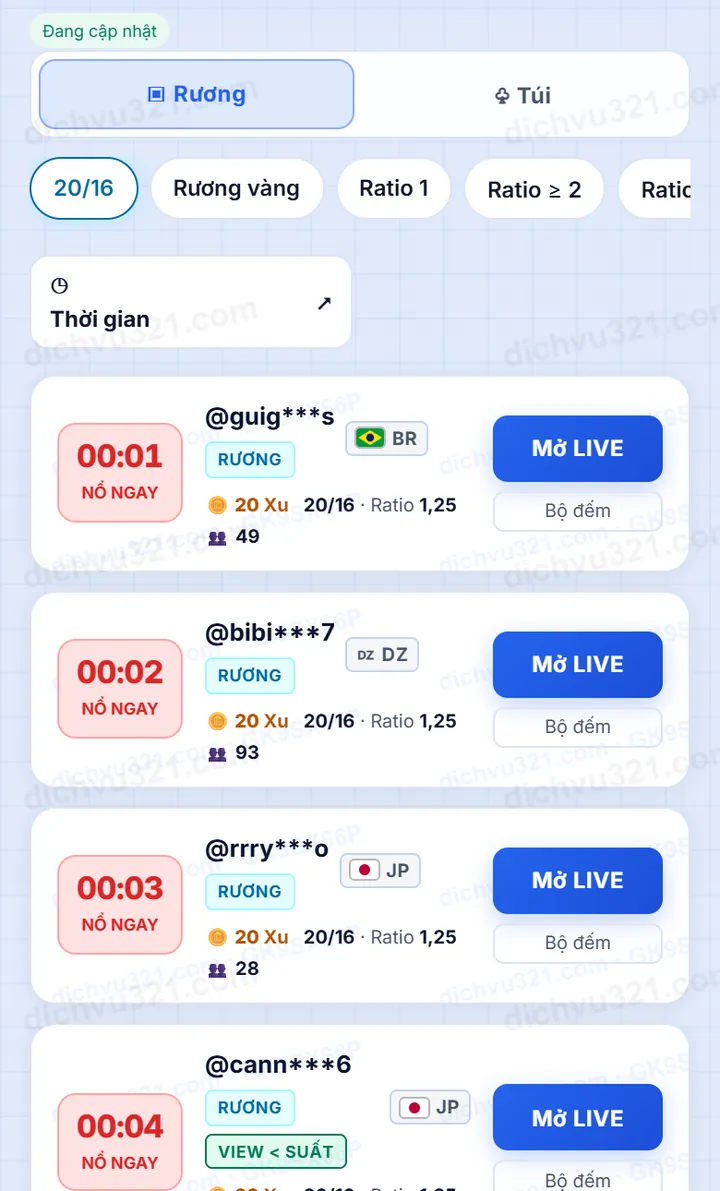
The screenshot below shows the same LIVE page under Pro: tabs no longer have lock icons, each room adds a “Counter” button, and the top-corner badge changes to PRO.
Pro plan: all tabs unlocked, with a “Counter” button on every room.
04
Plan Benefits Table in the PLANS Tab
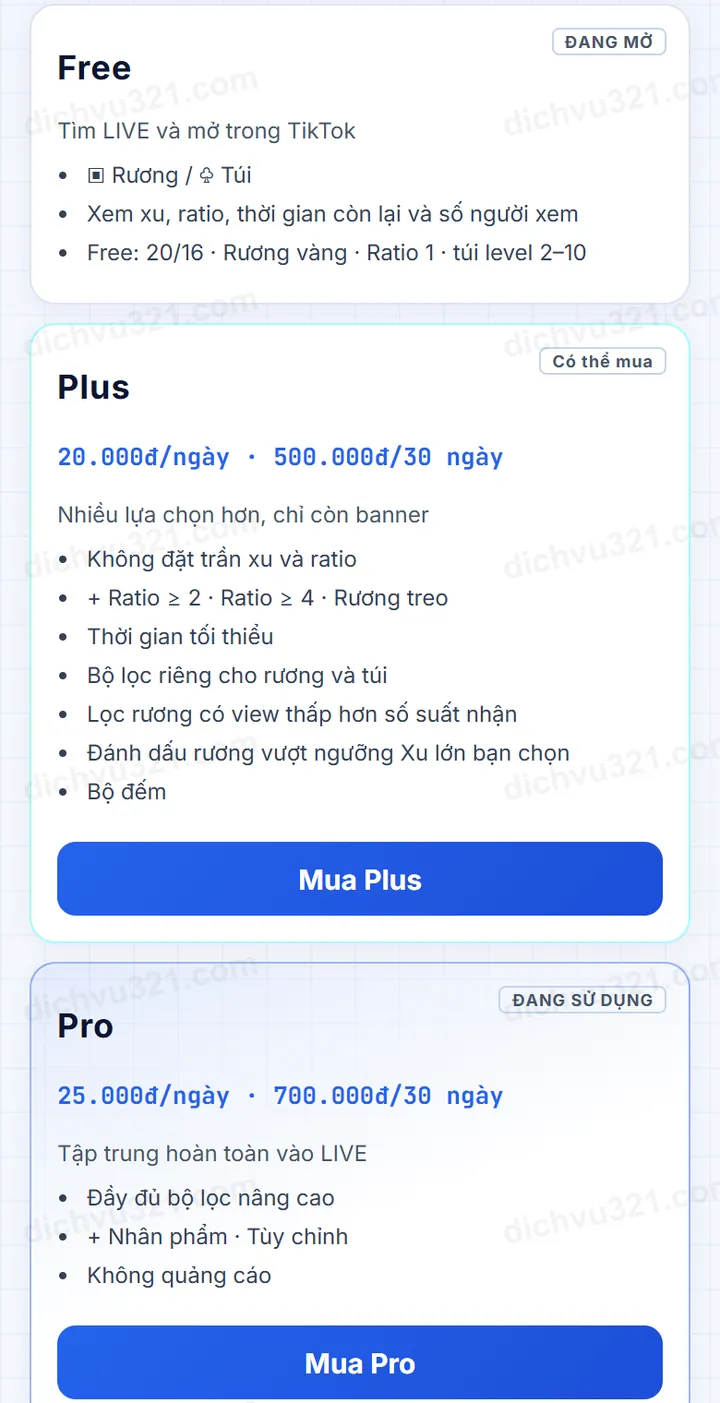
The PLANS · BUY KEY tab lists the benefits and pricing of each plan. Click “See the full plan comparison” to open the complete table: box tabs, bag tabs, time settings, advanced filters, Counter, and ads.
Current prices: Plus 20,000 coins per day or 500,000 coins for 30 days; Pro 25,000 coins per day or 700,000 coins for 30 days (1 coin = 1 VND). You get exactly the time you pay for, counted to the hour; from 30 days the monthly price applies.
Plan cards in the PLANS · BUY KEY tab: pricing and benefits for Free, Plus, and Pro.
05
Which Plan Should You Choose?
New to the platform or browsing occasionally: use Free, or get a free 1-hour Pro key from the free key button in the website footer to test it first. The community Telegram/Zalo groups also share free keys.
Need high-ratio tabs, gold boxes, hung boxes, bag levels 0 and 1, Time editing and a coin filter: choose Plus.
Need Lucky picks and Custom tabs, ratio and bag-level filters, the low-viewer filter and the fewest ads: choose Pro.
A 30-day purchase is usually more economical than paying daily; latest prices are always shown in the PLANS · BUY KEY tab.
06
Important Notes About Website Plans
Plus/Pro plans on the website are independent of the Android app. Each key works on one device at a time. To switch, tap “Remove code from this device” on the old device, then “Enter code” on the new one; see the guide to transferring key to another device.
Ratio is total coins divided by winning slots; a bag without slots uses participants. It is not the winning probability. You participate and claim rewards directly in TikTok; the website only helps you discover and open rooms.
LiveMira is an independent service and is not owned, sponsored, endorsed by or affiliated with TikTok or Telegram.
Does Free have a time limit?
No. Free can be used long-term; it only limits tabs and filters, and includes ads.
What is the biggest difference between Plus and Pro?
Pro adds the Lucky picks tab, Custom tabs for boxes and bags, the full advanced filters (Minimum ratio, bag levels, low-viewer filter) and shows just one small banner. Plus still has banner ads.
Does Plus filter boxes with fewer viewers than winning slots?
No. In the current interface that filter is only available on Pro.
Can I try Pro before buying?
Yes. Use the free key button in the website footer to get a 1-hour Pro key (once per day per device and per IP); see the free key guide. The community Telegram/Zalo groups also share free keys.
How do I upgrade from Plus to Pro?
Purchase a Pro plan and enter the Pro code. Contact support if you need help with your remaining Plus time.
Do plans renew automatically?
No. When time expires, the page automatically reverts to Free; purchase more whenever needed.
Can a web plan be used on the Android app?
No. The website and Android app manage plans separately.
LIVEMIRA LIVE
Ready to explore TikTok LIVE?
Choose a room in the Free list, then check the event in TikTok before participating.